

Ear Speaker Cleaner Sound — Fix Muffled Call Audio Free
Do your phone calls sound faint, muffled, or distant? The ear speaker — the small grille at the top of your phone — collects earwax, face oil, and dust with every call. This free ear speaker cleaner sound tool uses targeted 500Hz frequencies to push debris out of the earpiece grille in seconds.
Works on iPhone earpiece, Samsung call speaker, Xiaomi, Realme, Vivo, OnePlus, and all Android phones. No app. No download. Just press play.
👉 Tap below to clean your ear speaker now — free, no signup needed.🔊 Free Ear Speaker Cleaner
Tap play to eject water and dust
0%
Sound Mode
- The ear speaker can get blocked by dust, earwax, and pocket lint over time.
- Sound-based cleaning helps push out trapped debris and moisture safely.
- You can fix my speaker issues in 30–60 seconds using the tool above.
- Works on iPhone, Android, Samsung, AirPods, and most earbuds.
- No apps, tools, or disassembly needed in most cases.
- For better results, gently clean the speaker area with a soft brush or microfiber cloth.
- If the sound is still low after 2–3 attempts, professional cleaning may be required.
- When call volume is low or voices sound muffled
- After water, sweat, or moisture exposure
- When music or media audio works but call sound is unclear
- After gym use, outdoor activity, or humid environments
- To clean your ear speaker regularly and prevent dust buildup
- When you want to fix my speaker issues without opening your device
Fix Your Ear Speaker in 60 Seconds
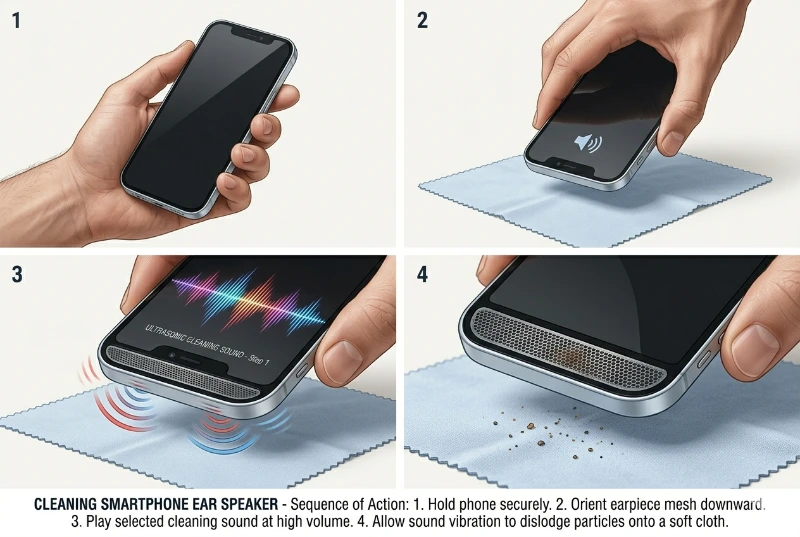
Follow these steps using the tool above:
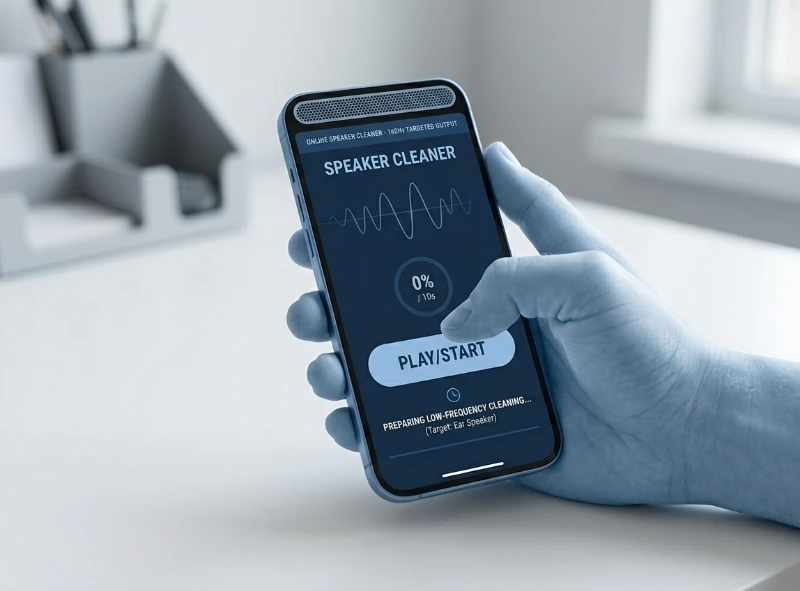
- Use the ear speaker cleaner tool shown above on this page.
- Select Water Eject if your speaker has moisture or a muffled sound.
- Select Dust Removal if the issue is dust, earwax, or lint.
- Set your phone volume between 60% and 80%.
- Hold your phone with the ear speaker facing downward.
- Tap Play and let it run for 30–60 seconds.
- Gently wipe the speaker area with a dry cloth.
- Make a test call to check sound clarity.
If the sound is still muffled, repeat 2–3 times.
👉 Try it now: Clean your speaker instantly with our Fix My Speaker tool — free and works in seconds.
Why You Need an Ear Speaker Cleaner Sound
Your ear speaker is one of the most-used parts of your phone. Every call, every voice message, every speakerphone session pushes tiny particles deeper into the speaker grill. Over weeks and months, this debris buildup compresses against the speaker diaphragm.
When the diaphragm cannot vibrate freely, the sound waves it produces get muffled or distorted. You hear a crackling sound, low volume, or a tinny quality. However, the speaker is not broken. It is just blocked.
An ear speaker cleaner sound tool plays a low-frequency vibration tone. That vibration shakes the debris loose from the acoustic chamber and speaker mesh so the diaphragm can move freely again. It is the same principle a subwoofer uses to rattle objects off a shelf, but at a controlled, safe frequency.
Ear Speaker vs. Bottom Speaker: What Is the Difference?
Most phones have two separate speaker units. Knowing which one is causing the problem saves you time.
| Feature | Ear Speaker | Bottom Speaker |
|---|---|---|
| Location | Top of phone (near ear) | Bottom edge of phone |
| Main Use | Phone calls (held to ear) | Media, music, alarms |
| Common Problems | Muffled voice during calls | Low music volume, distortion |
| Cleaning Frequency | 100Hz–300Hz tones | 165Hz–250Hz tones |
| User Type Affected | Call users most | Media/music users most |
If your calls sound muffled but music sounds fine, your ear speaker is the issue. If both are poor, debris may have reached both units.
How to Know If It Is Your Ear Speaker
Not every audio problem is the same. Use these quick checks to pinpoint the source before you start cleaning. Each scenario points to a different cause.
| What You Hear | What It Means | Action |
|---|---|---|
| Calls muffled, media fine | Ear speaker blockage | Run cleaning sound — 165Hz tone |
| Music also low or distorted | Airflow restriction in sound output channel | Clean both speakers; check software settings |
| One earbud quieter than the other | Earwax on that specific driver | Remove ear tip; brush + cleaning tone |
| Max volume but calls still quiet | Possible deeper issue or blockage | Run 3 cleaning cycles + soft brush |
| Muffled suddenly after yesterday | Fresh moisture or debris layer | Act quickly — clean before it hardens |
If calls are muffled but media sounds fine, you can be confident the ear speaker is the source. That is actually the best-case scenario because it responds very well to sound cleaning.
How Dust and Earwax Affect Speaker Performance
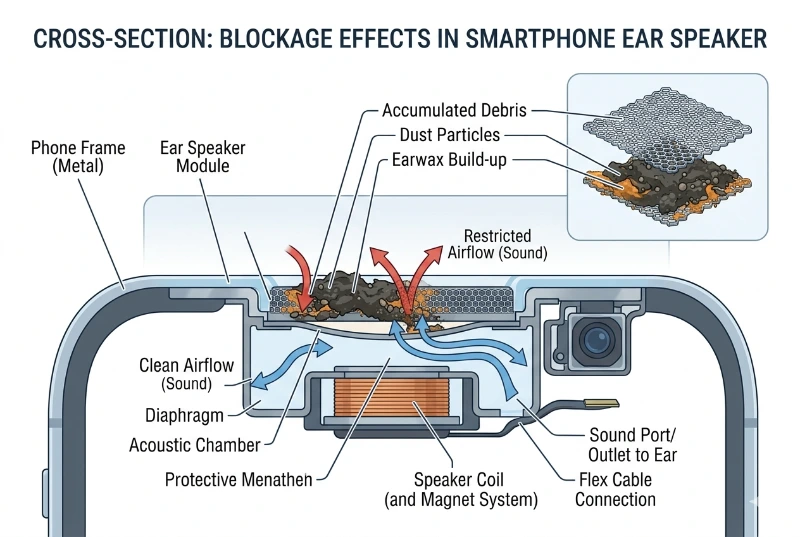
It happens gradually. You never notice one dust particle landing on the speaker grill. However, after weeks of daily use, the buildup becomes significant enough to affect audio output.
Here is what causes the most damage to ear speaker clarity:
The combined result is airflow restriction inside the acoustic chamber. Sound waves cannot project cleanly through the blocked sound output channel. That is why your ear speaker sounds low even at full volume — it is not a volume problem. It is a blockage problem.
The Science Behind Cleaning Sound
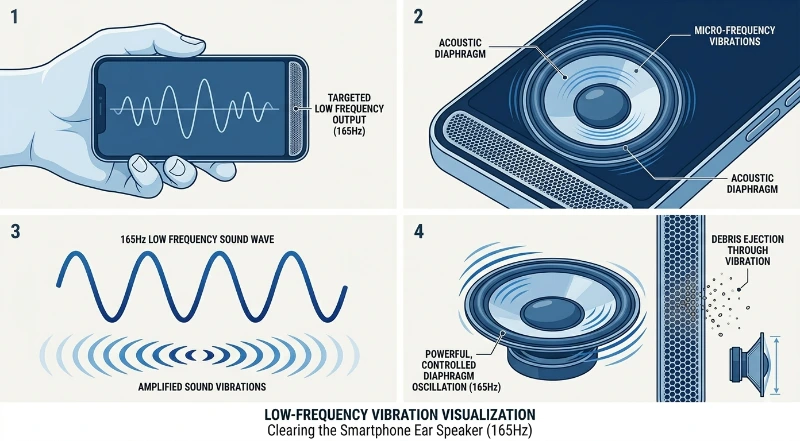
How Frequency and Vibration Clean Your Speaker
Every speaker works by converting electrical signals into physical vibrations. A tiny diaphragm — also called a membrane — moves back and forth rapidly to create sound waves. The faster it moves, the higher the pitch. The wider the movement, the louder the sound.
When debris blocks the speaker mesh or sits against the diaphragm, it dampens those vibrations. Lower frequencies — from 100Hz to 300Hz — create stronger physical movement than high-pitched tones. This is exactly why cleaning tones use the 165Hz to 200Hz range specifically.
At the 165Hz to 200Hz cleaning tone frequency, the diaphragm vibrates with enough physical force to dislodge loose particles from the speaker grill and internal speaker unit. The debris falls free from the acoustic chamber without any manual contact. It is non-invasive, effective, and takes under a minute. Because it works without tools or disassembly, sound-based cleaning is commonly recommended as a first-step solution before professional repair.
- Always use a tone in the 100Hz–300Hz range for ear speaker cleaning.
- 165Hz is the most commonly recommended frequency for call speaker cleaning.
- Set your volume between 60% and 80% of maximum for safe and effective results.
- Running the tone for more than 2–3 minutes per session is not necessary.
- Using very high volume repeatedly can stress the speaker diaphragm over time.
What Ear Speaker Cleaner Sound Works On (and What It Does Not)
| Situation | Does Cleaning Sound Work? |
|---|---|
| Dust and dry debris | ✔ Yes — vibration dislodges it effectively |
| Loose lint in speaker grill | ✔ Yes — usually resolves in 30–60 seconds |
| Recent water droplets / light moisture | ✔ Yes — helps expel water from acoustic chamber |
| Dried earwax on mesh | ⚠ Partially — may need manual cleaning |
| Hardened residue inside unit | ⚠ Limited — manual cleaning or repair needed |
| Physical damage to diaphragm | ✖ No — hardware repair required |
| Software or settings issue | ✖ No — check settings and audio output |
| Speaker blown by high volume | ✖ No — speaker replacement required |
Sound Cleaning vs. Manual Cleaning: Which Is Better?
| Factor | Sound Cleaning Tool | Manual Cleaning |
|---|---|---|
| Speed | ✔ 30–60 seconds | 5–10 minutes |
| Safety | ✔ Very safe, no contact | ⚠ Risk of pushing debris deeper if done wrong |
| Equipment Needed | ✔ None (free online tool) | Soft brush, microfiber cloth, isopropyl alcohol |
| Best For | Loose dust, lint, water | Stubborn wax, dried residue |
| Effectiveness | ✔ High for most common cases | ✔ Higher for stubborn buildup |
| Recommended Order | ✔ Use first | Use second if needed |
The best approach is to combine both. Use the cleaning sound tool first, then follow up with gentle manual cleaning for any remaining residue. Together, they give you restored sound quality faster than either method alone.
Real-Life Use Cases
After Water Exposure
Dropped your phone in a sink or got caught in the rain? Water droplets trapped in the ear speaker muffle call audio immediately.
Run the 165Hz cleaning sound with the phone speaker facing downward. The vibration pushes water droplets out from the sound output channel. This is the same method phone manufacturers recommend for water eject on newer devices.
After the Gym
Gym sweat introduces both moisture and salt into the speaker grill. Salt residue hardens once dry and creates a physical barrier against sound waves.
A cleaning sound session right after your workout removes moisture before it dries and hardens inside the acoustic chamber.
Everyday Dust Buildup
Even with careful use, daily phone usage gradually fills your speaker mesh with fine dust and pocket lint.
A weekly 60-second cleaning tone session prevents buildup from ever becoming severe. It takes less time than unlocking your phone.
Muffled AirPods or Earbuds
AirPods and earbuds have small internal speaker units that are even more prone to earwax and debris blockage than phone speakers.
A low-frequency cleaning sound helps dislodge loose particles. For earbuds, a soft brush on the mesh is especially effective before running the tone.
Step-by-Step Ear Speaker Cleaning Guide (Full Method)
🔍 Step 1: Diagnose the Problem
- Test your speaker sound by making a call or playing audio.
- Check your volume settings first. Make sure Do Not Disturb is off.
- Check audio output settings on your phone to confirm the ear speaker is selected.
- If sound is muffled or low volume on calls only, the ear speaker is the source.
🔊 Step 2: Run the Cleaning Sound
- Select the ear speaker / call speaker option.
- Choose a frequency between 165Hz and 200Hz.
- Set volume to 60–80% of maximum for safe and effective cleaning.
- Hold phone face down so the ear speaker faces the floor.
- Press Play and run the tone for 30 to 60 seconds.
- You may see tiny particles fall from the speaker. That is completely normal.
✅ Step 3: Check and Repeat
- Make a short test call to check audio clarity.
- If still muffled, repeat the cleaning sound for another 30-second cycle.
- Run up to 3 cycles total before moving to manual cleaning.
Optional: Manual Cleaning Steps
If the cleaning sound alone does not fully restore sound quality, add these manual steps. Also, because manual cleaning works differently from sound cleaning, combining both methods gives the best results.
- Use a soft-bristle brush (like a clean toothbrush or camera lens brush) to gently sweep across the speaker grill. Brush outward, never inward.
- Press a small piece of adhesive putty lightly onto the speaker mesh. Lift it straight off. It pulls debris out of the grill without pushing it deeper.
- Dampen a microfiber cloth very slightly with isopropyl alcohol (70% or higher). Lightly wipe the speaker grill surface. Do not let liquid enter the speaker.
- Never use cotton swabs directly on the speaker mesh. The fibers shred and add to the blockage.
- Never use compressed air directly into the speaker. High-pressure air pushes debris further into the internal speaker unit.
Device Compatibility
iPhone
The ear speaker on iPhones sits at the top of the screen. Apple devices respond well to the 165Hz cleaning tone. After running the tool, check Settings > Sounds > Ringers and Alerts to confirm volume is not restricted. Clean the mesh with a soft brush after running the tone for best results on older iPhone models.
Android and Samsung
Android phones vary in speaker placement and design. Samsung Galaxy models have particularly fine speaker mesh that traps lint easily. Run the cleaning sound and follow with a soft brush sweep. If your Samsung has a dedicated call clarity setting, enable it under Sound > Sound Quality and Effects after cleaning.
AirPods
AirPods mic muffled issues are almost always caused by earwax on the microphone or speaker grill. For AirPods, use a dry cotton swab (not on the mesh directly, but around the edges) and a soft brush across the grill. Then run a low-frequency tone at 60–80% volume. Apple provides specific AirPods cleaning instructions on its support page for stubborn cases.
Earbuds and Headphones
Most earbuds have removable ear tips. Remove the tips and clean them separately with mild soap. Run the cleaning tone on the driver unit with the tip removed. The exposed mesh cleans far more effectively without the ear tip blocking access.
For stubborn buildup, you can also follow Apple’s official cleaning guidelines for safe maintenance.
DIY Cleaning vs. Professional Repair
| Factor | DIY Cleaning | Professional Repair |
|---|---|---|
| Cost | ✔ Free | $30 – $150+ |
| Time | ✔ 1–5 minutes | Same day to several days |
| Risk | ✔ Minimal if done correctly | ✔ Low with certified technician |
| Best For | Debris and moisture issues | Physical damage, hardware failure |
| When to Choose | ✔ First attempt, always | After 3–4 failed cleaning attempts |
Always try DIY cleaning before spending money on a repair. Most muffled call audio cases are solved with a cleaning sound tool and a soft brush, not a technician.
Troubleshooting: Why Your Ear Speaker Is Still Muffled
Volume Is Set Correctly But Sound Is Still Low
This usually means debris is physically blocking the speaker mesh or restricting airflow inside the acoustic chamber. Run the cleaning sound for 2–3 cycles and follow with a soft brush. Also check whether a phone case is covering part of the ear speaker.
Sound Is Distorted or Crackling
Crackling sound often indicates loose debris inside the acoustic chamber rather than on the grill surface. A 165Hz cleaning tone for 60 seconds typically dislodges this. However, if crackling continues after three cycles, the diaphragm may have minor physical damage.
One Side of Headphones Is Quiet
This is almost always an earwax blockage on that specific driver. Remove the ear tip, clean the mesh, and run a cleaning tone. Also check your device balance settings under Accessibility.
Sound Improved Then Got Worse Again
Debris that was loosened by the cleaning tone may have settled back over the mesh. Repeat cleaning with the phone held speaker-down so gravity helps debris exit. Follow with a brush sweep immediately after.
Water Got Into Speaker But Cleaning Tone Did Not Help Fully
If significant water entered the device, the cleaning tone helps but may not remove all moisture. Place the phone in a dry, ventilated area — not rice, which can introduce starch particles — for several hours after running the tone.
Stop and contact a repair technician if any of the following occur:
- No sound at all from the ear speaker after multiple cleaning attempts
- Physical damage or cracks visible near the speaker grill
- The phone was submerged for more than a few seconds
- Cleaning sound made the audio quality noticeably worse
- You dropped the phone immediately before the audio problem started
Continuing to force-clean in these situations risks permanent hardware failure.
Common Mistakes to Avoid
Maintenance Tips: Prevent Future Blockage
A little prevention saves a lot of frustration. These habits keep your ear speaker working clearly long term.
Conclusion
Muffled call audio often feels like a serious issue, but in most cases, it is just dust or moisture blocking the ear speaker. Using an ear speaker cleaner sound for 30–60 seconds at the right frequency can quickly restore clear audio and improve call clarity.
Regular use of this method helps prevent buildup and keeps your speaker working properly. In most situations, this simple fix solves the problem without any risk or need for repair.